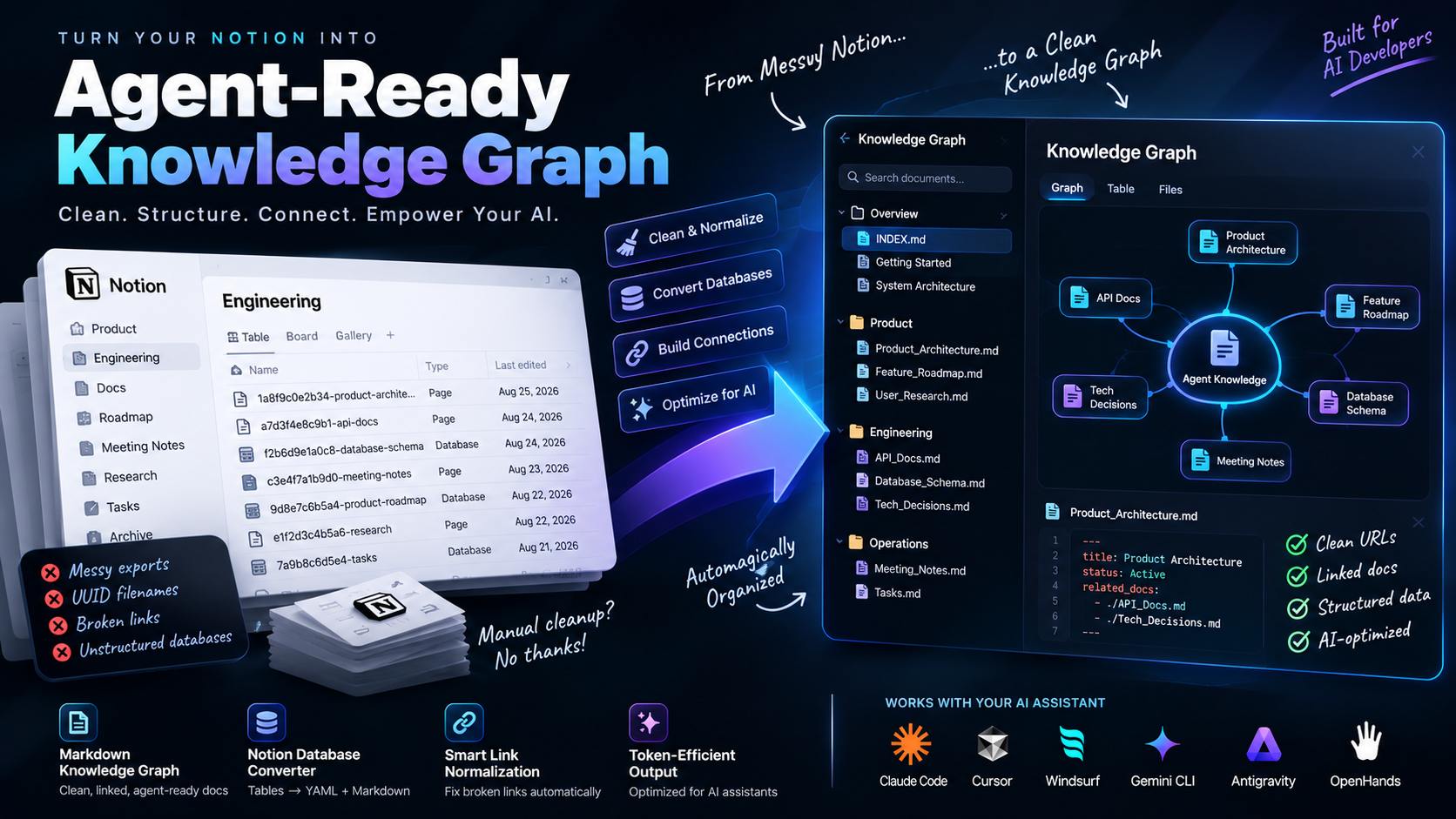
1. Why a Raw Notion Export Confuses AI Coding Agents
Teams that try to sync notion export to ai agent knowledge base setups by hand usually start with a straight file copy, and that's where it falls apart. Export a Notion workspace and you get a directory of files named like Product Architecture 1a8f9c0e2b3441f79c8e7d6a5b4c3d2e.md, API Specification 7f3d9b1a44c24af79c1e5b0a3d7f2e91.md, and a handful of nested subfolders that mirror however the team organized pages three reorganizations ago. Every internal link Notion generated points to https://notion.so/workspace/1a8f9c0e2b3441f79c8e7d6a5b4c3d2e, a URL that resolves fine in a browser and resolves to nothing for an agent reading local files.
Ask Claude Code or Cursor to work from that export directly and two things happen. First, the 32-character hex string tacked onto every filename burns tokens on every file listing without adding meaning. Second, the agent hits a broken notion.so link, can't follow it, and either skips the referenced document or guesses at what it might have said. Neither failure shows up as an error, it shows up three prompts later as a decision the agent made without the context it needed.
The core problem: Notion optimizes filenames and links for its own database, not for a filesystem an agent walks with
grepand relative paths. Sync notion export to ai agent knowledge base workflows exist specifically to close that gap before the agent ever opens a file.
2. The 5-Phase Sync: From Export Directory to Linked Knowledge Graph
The Notion to Agent Knowledge Graph Synchronizer skill runs the conversion as five ordered phases, each one fixing a specific failure mode from the raw export:
| Phase | What It Does | Failure Mode It Fixes |
|---|---|---|
| 1. UUID Stripping | Removes the 32-character hex string from every filename | Agent burns tokens parsing meaningless identifiers in file listings |
| 2. Link Normalization | Converts notion.so/workspace/... URLs into relative Markdown links |
Agent hits dead links and skips or guesses at referenced content |
| 3. Database Serialization | Turns Notion CSV/database exports into YAML frontmatter + Markdown tables | Bulky relational exports get flattened into unusable text blobs |
| 4. Index Synthesis | Builds a master INDEX.md categorized by Domain, Architecture, APIs, and Decision Logs |
Agent has no single entry point and re-scans the whole directory each session |
| 5. Token-Budget Verification | Strips blank lines, duplicate drafts, and decorative icons | The synced knowledge base creeps past what fits in a single context load |
3. Notion to Markdown Converter for AI Agents: What Phase 1 and 2 Actually Change
Here's the same document before and after the strip-and-normalize pass. Before:
<!-- Product Architecture 1a8f9c0e2b3441f79c8e7d6a5b4c3d2e.md -->
# Product Architecture

See the auth flow: https://notion.so/workspace/7f3d9b1a44c24af79c1e5b0a3d7f2e91
Related database: https://notion.so/workspace/9e2c1a08b5f14ea3902f7c6d8b1a4e37
After:
<!-- Product_Architecture.md -->
# Product Architecture

See the auth flow: [Auth_Overview.md](./Architecture/Auth_Overview.md)
Related database: [Feature_Matrix.md](./Databases/Feature_Matrix.md)
Two things changed and both matter. The filename dropped 1a8f9c0e2b3441f79c8e7d6a5b4c3d2e entirely, clean filenames are a hard rule, not a style preference, because a coding agent scanning a directory listing treats every extra token as something it has to reason about. And the dead notion.so links became relative paths an agent can open with a plain file read, no browser resolution required. That's the bidirectional link index a knowledge graph needs to let an agent traverse dependencies without running a grep scan first.
That example shows web links resolving cleanly, but the more common link in a real export isn't a notion.so URL at all, it's one exported file linking to another by that other file's original, UUID-suffixed name ([Auth Overview](Auth%20Overview%201a8f9c0e2b3441f79c8e7d6a5b4c3d2e.md)). Rename the target file without rewriting that reference too, and the link now points at a file that no longer exists. The sync keeps an old-filename → new-filename map from the moment it starts renaming, and rewrites every reference, both link shapes, against that map, not just the ones that happen to be notion.so URLs.
The same map also catches something Notion allows and every real export eventually has: two different pages with the same title (a "Meeting Notes" under Sales and another under Engineering, say). Strip the UUID from both and they'd collide on the same output filename, silently overwriting one. The sync disambiguates using the parent folder instead (Sales_Meeting_Notes.md, Eng_Meeting_Notes.md) and reports every collision it had to resolve, so nothing gets quietly dropped.
4. Notion Database to YAML Frontmatter: Serializing Relational Exports
A Notion database export (a feature tracker, a status board, a roadmap CSV) doesn't read like a document, it reads like a spreadsheet dumped into Markdown, with every row repeating every column header. Phase 3 collapses that into frontmatter plus a compact table:
title: User Authentication Feature Matrix
status: Completed
assigned_team: Core Backend
last_reviewed: 2026-08-27
related_docs:
  - "./Architecture/Auth_Overview.md"
  - "./APIs/JWT_Specification.md"
# User Authentication Feature Matrix

| Feature | Protocol | Status | Token Overhead |
|---|---|---|---|
| OAuth2 Login | Google / GitHub | Active | Low |
| Magic Link | Resend Email | Active | Minimal |
An agent reading this gets the status and ownership metadata in three lines of frontmatter it can parse without touching the table, plus a table it only opens when the task actually needs feature-level detail. Compare that to the raw export, where the same information is buried across forty rows of repeated Notion property columns.
5. Running the Sync Inside Claude Code, Cursor, or Windsurf
The skill installs the same way any Claude Code skill does, drop SKILL.md into the project's skills directory, then runs from a single natural-language prompt against the export directory:
"Using the notion-to-knowledge-graph-sync skill, clean this messy Notion export
directory, strip all UUIDs, and generate a linked Knowledge Graph for our coding agents."
For a database-heavy export specifically:
"Using the notion-to-knowledge-graph-sync skill, transform this Notion feature
roadmap CSV export into structured Markdown files with YAML frontmatter."
It reads and writes local files only, no external network calls, no Notion API key, no OAuth handshake. The whole conversion happens inside the agent session, which matters if the export contains anything a team wouldn't want leaving the machine. Compatibility covers Claude Code, Cursor, Windsurf, Gemini CLI, Google Antigravity, and OpenHands.
Frequently Asked Questions
How does the sync handle messy Notion export artifacts?
It strips the 32-character hexadecimal UUID from every file and folder name, rewrites broken notion.so internal links into valid relative Markdown links, and flattens deep nested folder structures into a flat, navigable directory.
Does converting to a knowledge graph lose Notion database properties?
Simple properties, status, ownership, dates, select/multi-select, convert cleanly into structured YAML frontmatter plus a searchable Markdown summary table. relation properties get rewritten to point at the renamed target file rather than the raw Notion reference. rollup properties are the one exception worth knowing about: a rollup is a live computed value inside Notion's own database, so the sync resolves it to whatever it was at export time, it can't stay "live" once it's a static Markdown file.
Why does the sync target a token budget for the index?
Because a coding agent needs to load the whole index in one context pass alongside the actual task, around 6,000 tokens is a reasonable default for a mid-size workspace, but it's a target to tune to the workspace's actual size, not a hard ceiling that starts dropping real content once a workspace grows past it.



Comments
Comments are reviewed before appearing publicly.
No comments yet — be the first.