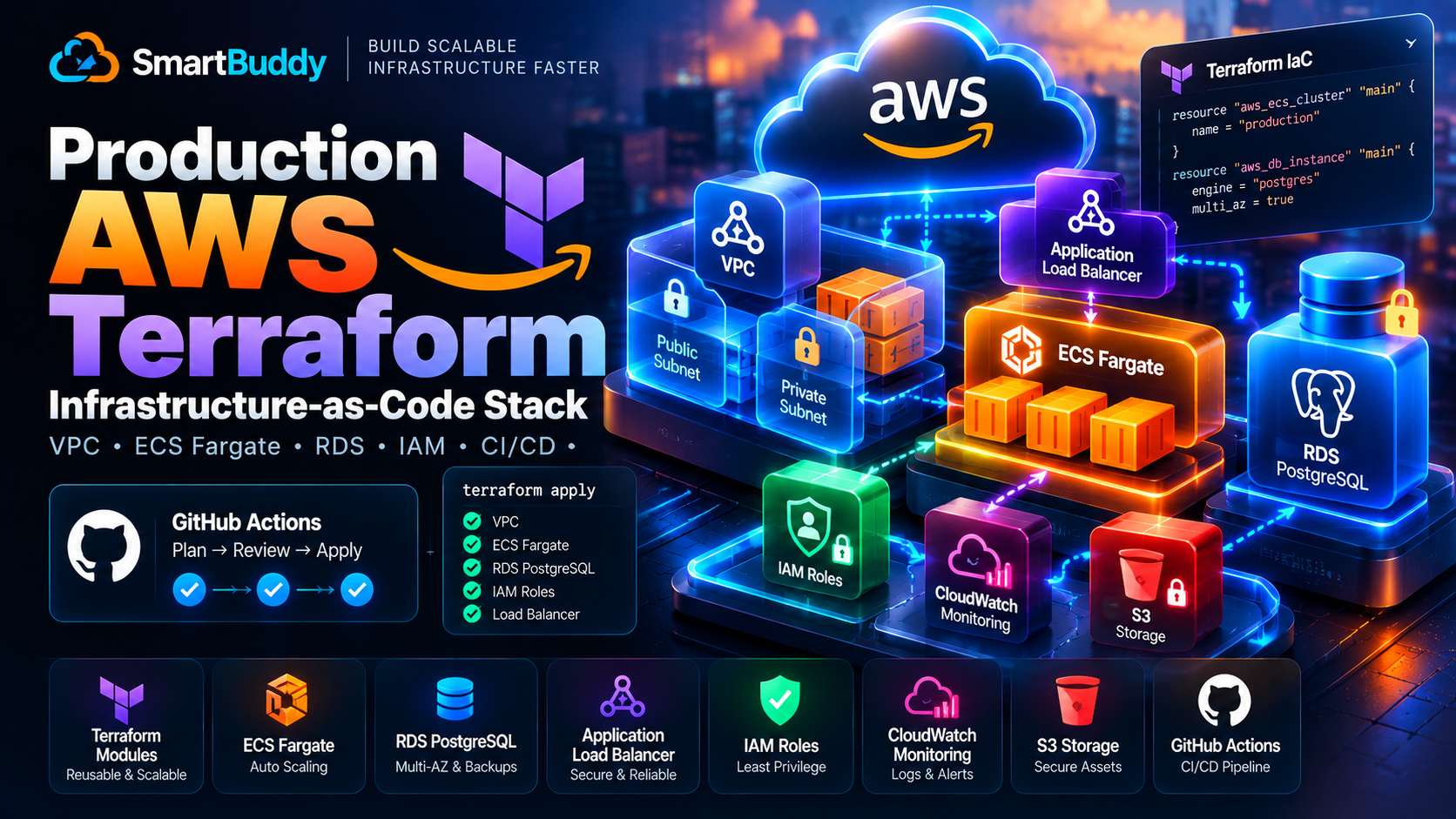
Clicking around the AWS Management Console to set up servers is fine when you are hacking on a weekend prototype. But in production, "ClickOps" is an operational disaster waiting to happen: configurations drift invisibly, security group rules get left wide open, and reproducing environments for staging requires hours of manual guesswork.
Infrastructure as Code (IaC) with Terraform gives you deterministic, version-controlled cloud environments.
However, many Terraform starter templates take dangerous shortcuts: they put databases in public subnets, hardcode long-lived AWS secret access keys into CI/CD pipelines, and skip state locking.
A few weeks ago, Amir and I provisioned a clean, production-grade AWS environment for a client scaling their microservices. Here is the exact Terraform architecture we deployed, featuring multi-AZ network isolation, containerized ECS Fargate tasks, private database clustering, and keyless GitHub Actions authentication via AWS OIDC.
The Three Most Common AWS Infrastructure Flaws
- Hardcoded AWS credentials in CI: Storing static
AWS_ACCESS_KEY_IDandAWS_SECRET_ACCESS_KEYin repository secrets creates massive credential leakage risk. Modern pipelines should use temporary AWS OIDC role assumption. - Public database subnets: Placing RDS instances in public subnets and relying solely on security groups invites automated port scanning. Databases must live in isolated private subnets with no internet routes.
- Missing remote state locking: Storing
.tfstatefiles locally or in an unlocked S3 bucket leads to state file corruption when two engineers or CI pipelines runterraform applyconcurrently.
Remote State Backend with S3 and DynamoDB Locking
Before creating resources, bootstrap a dedicated state backend:
// backend.tf
terraform {
  required_version = ">= 1.9.0"

  required_providers {
    aws = {
      source  = "hashicorp/aws"
      version = "~> 5.60.0"
    }
  }

  backend "s3" {
    bucket         = "production-terraform-state-bucket"
    key            = "core-infra/terraform.tfstate"
    region         = "us-east-1"
    dynamodb_table = "terraform-state-locks"
    encrypt        = true
  }
}
The DynamoDB table prevents concurrent state updates, while S3 server-side encryption and versioning keep your state protected against accidental deletions.
Multi-AZ VPC Network Topology
We segment network traffic into three distinct tiers: public subnets (for Application Load Balancers), private subnets (for ECS container tasks), and isolated database subnets:
// vpc.tf
module "vpc" {
  source  = "terraform-aws-modules/vpc/aws"
  version = "5.13.0"

  name = "production-vpc"
  cidr = "10.0.0.0/16"

  azs              = ["us-east-1a", "us-east-1b", "us-east-1c"]
  public_subnets   = ["10.0.1.0/24", "10.0.2.0/24", "10.0.3.0/24"]
  private_subnets  = ["10.0.10.0/24", "10.0.11.0/24", "10.0.12.0/24"]
  database_subnets = ["10.0.20.0/24", "10.0.21.0/24", "10.0.22.0/24"]

  enable_nat_gateway     = true
  single_nat_gateway     = false # High availability across AZs
  create_database_subnet_group = true

  enable_dns_hostnames = true
  enable_dns_support   = true

  tags = {
    Environment = "production"
    ManagedBy   = "terraform"
  }
}
ECS containers in private subnets reach the internet through NAT Gateways for outbound package downloads, but direct inbound connections from the public internet are physically impossible.
Serverless Containers on ECS Fargate
ECS Fargate allows you to run containers without managing underlying EC2 virtual machines.
// ecs.tf
resource "aws_ecs_cluster" "main" {
  name = "production-ecs-cluster"

  setting {
    name  = "containerInsights"
    value = "enabled"
  }
}

resource "aws_ecs_task_definition" "api" {
  family                   = "api-service"
  network_mode             = "awsvpc"
  requires_compatibilities = ["FARGATE"]
  cpu                      = "512"
  memory                   = "1024"
  execution_role_arn       = aws_iam_role.ecs_execution.arn
  task_role_arn            = aws_iam_role.ecs_task.arn

  container_definitions = jsonencode([
    {
      name      = "api"
      image     = "${aws_ecr_repository.api.repository_url}:latest"
      essential = true
      portMappings = [
        {
          containerPort = 3000
          hostPort      = 3000
        }
      ]
      logConfiguration = {
        logDriver = "awslogs"
        options = {
          "awslogs-group"         = "/ecs/api-service"
          "awslogs-region"        = "us-east-1"
          "awslogs-stream-prefix" = "api"
        }
      }
    }
  ])
}
Keyless Deployment via GitHub Actions OIDC
Never generate permanent IAM user access keys for CI/CD. Instead, configure an AWS OIDC identity provider that trusts your specific GitHub organization and repository:
# .github/workflows/deploy.yml
name: Terraform Production Deploy

on:
  push:
    branches: [main]

permissions:
  id-token: write # Required for requesting the JWT
  contents: read

jobs:
  deploy:
    runs-on: ubuntu-latest
    steps:
      - name: Checkout Code
        uses: actions/checkout@v4

      - name: Configure AWS Credentials via OIDC
        uses: aws-actions/configure-aws-credentials@v4
        with:
          role-to-assume: arn:aws:iam::123456789012:role/github-actions-terraform-role
          aws-region: us-east-1

      - name: Setup Terraform
        uses: hashicorp/setup-terraform@v3
        with:
          terraform_version: 1.9.0

      - name: Terraform Plan & Apply
        run: |
          terraform init
          terraform apply -auto-approve
GitHub requests a short-lived token valid only for the duration of the deployment step. Even if build logs are compromised, there are zero permanent secrets to revoke.
Production Cloud Best Practices
- Pin exact module versions: Use
version = "5.13.0"instead of floating ranges to prevent unexpected breaking changes on CI runs. - Least-privilege security groups: Allow database traffic only from the ECS task security group, never from entire subnet ranges.
- Automated database backups: Enable RDS automated backups with deletion protection active in production.

Comments
Comments are reviewed before appearing publicly.
No comments yet — be the first.