Why a 45-Minute Episode Eats an Evening
Most people searching for a podcast show notes generator AI tool are already past the "nice to have" stage, they've shipped a few episodes by hand and know exactly how long it takes. A one-hour podcast recording produces a transcript north of 8,000 words once it's run through Whisper or Descript. Turning that into a publishable episode page means someone has to relisten (or reread) for natural topic breaks, hand-type each timestamp in MM:SS - Title format, pull 2 usable pull-quotes without misremembering the wording, and separately track every book, repo, or tool the guest name-dropped mid-conversation. Miss the 00:00 chapter and YouTube won't render any of the timestamps as clickable chapters at all, the whole list gets silently dropped, even if every other line is formatted correctly.
Most solo podcasters solve this by cutting corners: they ship an episode with three vague chapters instead of eight precise ones, or they skip the resources section because tracking down the GitHub link the guest mentioned at minute 19 takes longer than editing the audio did. The Podcast Show Notes & Chapter Marker Bot treats the transcript as the single source of truth and runs the same five-phase pass against it every time, regardless of which app exported the file.
1. Phase 1, Multi-Format Transcript Ingestion: What Any Podcast Show Notes Generator AI Needs First
The skill's first job is figuring out what kind of file it's looking at, because Whisper, Descript, and Otter.ai each timestamp their transcripts differently:
| Source | Timestamp Format | Example |
|---|---|---|
| OpenAI Whisper (JSON/VTT/SRT) | Exact float start/end seconds | start: 0.0, end: 4.2 |
| Descript export | Inline speaker + paragraph timestamp | Speaker 1 [00:04:15]: Text... |
| Otter.ai | Speaker header line above each block | Speaker Name 12:34 |
| Raw plain text | No timestamps, chapters inferred from topic shifts | , |
Alongside the transcript, it also ingests episode metadata, host name, guest name, and the episode's core topic, because that context feeds directly into how Phase 3 titles and summarizes the episode.
2. Phase 2, Chapter Timestamps That Actually Render
When the source has real timing data, Whisper, Descript, or Otter.ai, the skill produces a clean, standards-compliant chapter list straight from those timestamps:
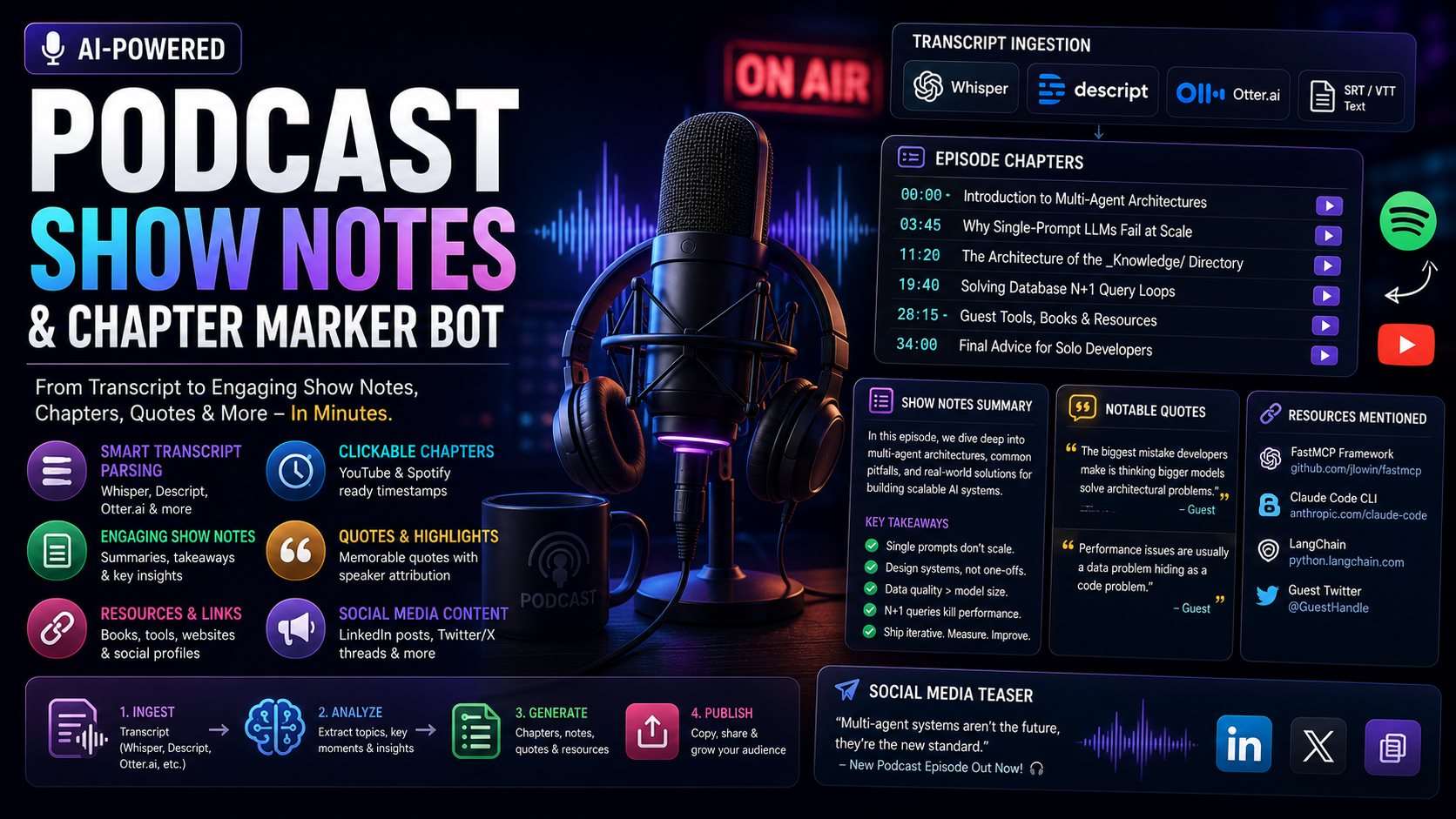
00:00 - Introduction to Multi-Agent Architectures
03:45 - Why Single-Prompt LLMs Fail at Scale
11:20 - The Architecture of the _Knowledge/ Directory
19:40 - Solving Database N+1 Query Loops
28:15 - Guest Tools, Books & Recommended Resources
34:00 - Final Advice for Solo Developers
The strict rule behind this output: the first chapter must always be 00:00, because that's the anchor both YouTube's description parser and Spotify for Podcasters use to detect that a chapter list is present at all. A list that starts at 00:12 instead of 00:00 typically gets ignored outright rather than rendered with a missing first entry.
Raw plain text has no timing data to derive real timestamps from, so the skill doesn't fake them. Instead it infers topic-based chapter boundaries and labels the whole list as an editorial suggestion, not a rendered timestamp:
[Untimed, editorial chapter suggestions, source transcript has no timestamps]
1. Introduction to Multi-Agent Architectures
2. Why Single-Prompt LLMs Fail at Scale
3. The Architecture of the _Knowledge/ Directory
...
3. Phase 3, Show Notes Synthesis
This is where the raw transcript becomes something a listener would actually read before hitting play. The skill generates:
- 3 episode title variations, one built for curiosity, one for direct benefit, one for authority/credibility, so there's a real choice instead of one guess.
- A 2-3 sentence episode summary written as a value hook for podcast app previews, not a plot recap.
- 4-6 key takeaway bullets pulled from the substance of the conversation.
- 2 notable quotes, verbatim, each tagged with the speaker who said it, the skill's accuracy rule here is explicit: quotes must match the transcript exactly, with no smoothing or paraphrasing, because a misquoted guest is a credibility problem the host has to clean up publicly.
4. Phase 4, The Resources & Link Directory
Guests mention things mid-sentence, a GitHub repo, a book title, a Twitter handle, and those references are easy to lose track of once the recording ends. The skill scans the full transcript for every referenced tool, repository, or social profile and compiles them into one block:
### 🔗 Resources Mentioned in This Episode:
- FastMCP Framework: https://github.com/jlowin/fastmcp
- Claude Code CLI by Anthropic: https://anthropic.com/claude-code
- Guest Twitter: @GuestHandle
That list becomes the show notes' most-clicked section for a technical audience, listeners who want the repo link don't have to scrub back through 40 minutes of audio to find the minute where it was mentioned.
5. Phase 5, Social Teaser & Newsletter Copy
The last phase turns the episode into two pieces of promotional copy in the same pass: one LinkedIn post built around the single most valuable insight from the conversation, and one Twitter/X announcement thread with suggested clip-quote moments for anyone cutting a short video teaser. Neither is generic "new episode is live" copy, both are built from the same 4-6 takeaways Phase 3 already extracted, so the promotional angle matches what the episode is actually about.
6. Running the Podcast Show Notes Generator AI Against Your Own Transcript
Install is a straight file copy into the project's skills directory:
# Claude Code
mkdir -p .claude/skills/podcast-show-notes-bot
cp SKILL.md .claude/skills/podcast-show-notes-bot/
Cursor, Windsurf, Gemini CLI, Google Antigravity, and OpenHands each read the same SKILL.md file, only the target skills directory differs, and that path is documented per-tool. Once it's loaded, a single prompt runs all five phases against a pasted transcript:
"Using the podcast-show-notes-bot skill, analyze this Whisper JSON transcript
and generate YouTube chapters, show notes, and memorable quotes."
For a Descript export specifically, the same skill can be scoped to a tighter output:
"Using the podcast-show-notes-bot skill, extract clean 5-minute interval
chapter markers and titles from this Descript transcript."
Nothing here leaves the local agent session, there's no external API call to a transcription service, since the transcript is already text by the time the skill sees it. That also means no API key setup and no per-episode processing cost beyond the agent session itself.
7. Why Format Detection Matters More Than It Looks
The three input formats aren't cosmetic differences. Whisper's raw JSON gives float seconds (245.8) that need converting to MM:SS; Descript embeds the timestamp inside the speaker line itself; Otter.ai puts the timestamp on its own header line above the spoken text. A parser built for only one of these silently mangles the other two, timestamps end up off by a full paragraph, or speaker names get folded into the show notes text by mistake. The skill's ingestion phase is built to keep those three parsing paths separate rather than forcing one regex to handle all three, which is the part that breaks first in a hand-rolled script.
Frequently Asked Questions
Which transcript formats does the podcast show notes generator support?
OpenAI Whisper (JSON timestamps, VTT, SRT), Descript exports with inline speaker/timestamp formatting, Otter.ai transcripts with header-line timestamps, and raw plain text where chapters get inferred from topic shifts instead of timestamp data.
Does it produce timestamps that work on both YouTube and Spotify?
Yes. Chapters are output in the MM:SS - Title format both platforms expect, with the first chapter always fixed at 00:00 — the specific rule that keeps YouTube's chapter parser from dropping the whole list.
What does the $12 license cover?
It's a Commercial Developer License (Single-User, No Resale): unrestricted use for internal production, client podcasts, and commercial shows, but reselling or redistributing the raw SKILL.md file is not permitted.



Comments
Comments are reviewed before appearing publicly.
No comments yet — be the first.