Why a Script Doesn't Turn Into a Storyboard by Itself
Most people trying to go from script to video prompts start in Midjourney's Discord bot, type out a scene description from memory, get a face that doesn't match the previous shot, retype the --seed flag from a note they took three tabs ago, then switch to Runway to figure out camera motion syntax for the same frame. A 12-shot commercial script done this way means 12 rounds of that loop, and by shot 8 the "exhausted engineer at midnight" from shot 1 has quietly become a different-looking person because nobody carried the seed forward consistently.
The problem isn't creativity, it's that a script contains dialogue and action, not model syntax. Turning "she pitches the idea and the room goes quiet" into a working prompt means deciding lens, lighting, camera move, and character continuity all at once, then re-encoding that decision four different ways for four different generative engines that don't share a prompt format.
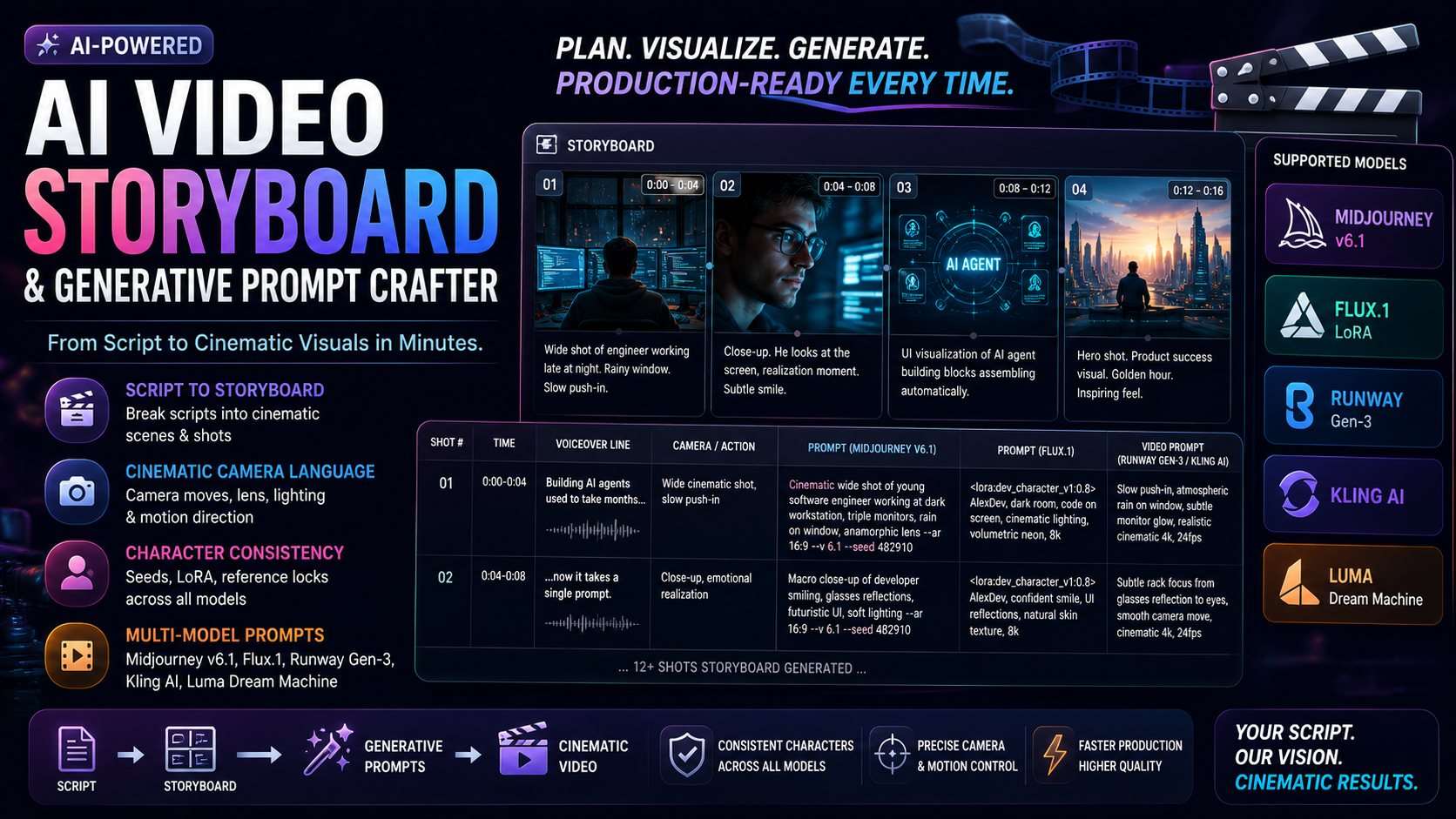
The AI Video Storyboard & Generative Prompt Crafter skill treats this as a pipeline: one script comes in, a fixed set of visual and character anchors gets locked first, then every shot in the storyboard inherits those anchors instead of reinventing them.
1. Phase 1, Script Segmentation Into Visual Beats
The skill takes a script, voiceover timing, or a loose concept outline and breaks it into discrete 3-to-5-second visual beats, what the skill calls Scenes & Shots. A 60-second script segments into roughly 12 to 16 beats at that pace, which is short enough that each one maps to a single camera setup instead of trying to cram two ideas into one frame.
2. Phase 2, Locking the Character and Visual Anchor Before Any Prompting Starts
This is the step that prevents the "different face by shot 8" problem, and it's model-specific because no two generative engines handle continuity the same way:
| Model | Consistency Mechanism | Example Syntax |
|---|---|---|
| Midjourney v6.1 | Seed parameter + character reference tag | --seed 482910 --cref [URL] --cw 80 |
| Flux.1 | Custom LoRA trigger token + locked physical descriptors | <lora:dev_character_v1:0.8> AlexDev |
| Kling AI / Runway Gen-3 | Face-anchor reference frame + locked text descriptors | Uploaded reference frame + fixed prompt keywords |
Alongside the character anchor, the skill fixes a color palette (e.g. cyberpunk neon teal and amber, or natural volumetric golden hour) and a camera/lens profile (e.g. anamorphic 50mm, f/1.8) once, at the top of the storyboard, every subsequent shot prompt inherits these instead of restating them from scratch and risking drift.
3. Phase 3, The Frame-by-Frame Storyboard Table
This is where the script actually turns into usable prompts. Each row is one shot, with the voiceover line, the camera direction, and a ready-to-paste generative prompt sitting side by side:
| Shot # | Time | Voiceover Line | Visual Action & Camera Direction | Generative Prompt |
|---|---|---|---|---|
| Scene 01 | 0:00-0:04 | "Building AI agents used to take months..." | Wide establishing shot of exhausted engineer at triple-monitor setup, slow push-in | /imagine prompt: Cinematic wide shot of young software engineer at dark workstation, triple glowing monitors, rain on window, anamorphic lens, volumetric neon lighting, photorealistic 8k --ar 16:9 --style raw --v 6.1 --seed 482910 |
| Scene 02 | 0:04-0:08 | "...now it takes a single prompt." | Extreme close-up, smiling, daylight studio, UI graphics reflecting in glasses | <lora:dev_character_v1:0.8> AlexDev, macro close-up shot of software developer confident smile, clean modern glass office, morning sunlight, futuristic glowing UI reflections, 35mm f/1.8, 8k resolution |
Notice the seed (482910) from Phase 2 shows up again in Scene 01's prompt, and the LoRA token (AlexDev) from the Flux setup shows up again in Scene 02, that's the continuity anchor doing its job across two shots that, on paper, could have been generated by two unrelated prompts.
4. Phase 4, Video Motion Directives for Runway, Luma, and Kling
A still-frame prompt and a motion prompt are different disciplines, so the skill outputs both for each shot. Where Midjourney and Flux need an /imagine or LoRA-tagged prompt, Runway Gen-3, Luma, and Kling AI need camera-and-motion language instead:
Runway Gen-3 / Luma:
[Camera: Slow zoom-in, 3D pan right] [Motion: Atmospheric rain particles on glass, developer typing on mechanical keyboard]

Kling AI:
Cinematic motion, subtle breathing, rack focus from keyboard to glowing monitor, smooth camera track, photorealistic 4k, 30fps
Neither of these lines mentions a seed or LoRA token, motion-focused models rely on the face-anchor reference frame uploaded in Phase 2 instead, which is why that phase treats reference-frame upload as a separate, required step rather than an optional extra for those two engines specifically.
5. Phase 5, Voiceover and Audio Cue Sync
The last output is the finished shot list with SFX and background-music transition points attached to the same timestamps used in Phase 1's segmentation, so the storyboard doubles as an editing reference and not just a prompt archive.
6. How to Build a Video Storyboard From a Script, Step by Step
Installing the skill is a file copy, same as any other Claude Code skill:
mkdir -p .claude/skills/video-storyboard-prompt-crafter
cp SKILL.md .claude/skills/video-storyboard-prompt-crafter/
Then a single prompt runs all five phases against a script:
"Using the video-storyboard-prompt-crafter skill, convert this 60-second SaaS promo
script into a 12-frame visual storyboard with Midjourney v6.1, Flux.1, Runway Gen-3,
Luma Dream Machine, and Kling AI prompts."
Every phase runs inside the local agent session against the script text handed to it, the skill's listing states no external network permissions are required, so there's no API key to configure before the first storyboard comes back.
7. The Rule That Keeps Text Out of Image Prompts
One invariant the skill enforces on every single frame: it will not ask an image-generation model to render on-screen typography. Diffusion models routinely garble embedded text into unreadable glyphs, so captions, lower-thirds, and titles get planned as a separate editing-timeline step instead of baked into the Midjourney or Flux prompt itself. It's a small rule, but it's the difference between a storyboard frame you can actually use and one you have to regenerate five times hoping the logo comes out legible.
Frequently Asked Questions
Which image and video generation models does this work with?
Midjourney v6.1, Flux.1 (Dev/Schnell), Runway Gen-3 Alpha, Luma Dream Machine, and Kling AI — each gets its own prompt syntax and, where relevant, its own character-consistency mechanism.
How does it keep the same character consistent across 12+ shots?
Phase 2 locks a Master Character Anchor once — a Midjourney seed and --cref tag, a Flux LoRA trigger token, or a Kling/Runway face-anchor reference frame — and every subsequent shot prompt in the storyboard reuses that same anchor instead of re-describing the character from memory.
What license comes with the $14 purchase?
It ships under a Commercial Developer License (Single-User, No Resale): unlimited internal use, client work, and commercial video production, but redistributing or reselling the raw SKILL.md file is not permitted.



Comments
Comments are reviewed before appearing publicly.
No comments yet — be the first.