The Real Cost of Manual Repurposing
Most people who want to repurpose a YouTube video into social media posts start the same way: open a Google Doc, paste the transcript, and start manually copying quotable lines into four different tabs. A 25-minute YouTube video produces roughly 4,000 words of raw transcript. Turning that into a Twitter thread alone means reading it twice, picking out the 3 or 4 lines worth quoting, and rewriting each one to fit 280 characters. Do that again for LinkedIn, again for a newsletter blurb, again for a Shorts script, and a single video eats an afternoon before the editing software even opens.
Most teams solve this by skipping formats. The thread gets written because it is fast; the newsletter digest gets skipped because nobody has 40 minutes left in the day. The video's best insight, the one that took the guest 20 minutes to build up to, ends up living in one channel and nowhere else.
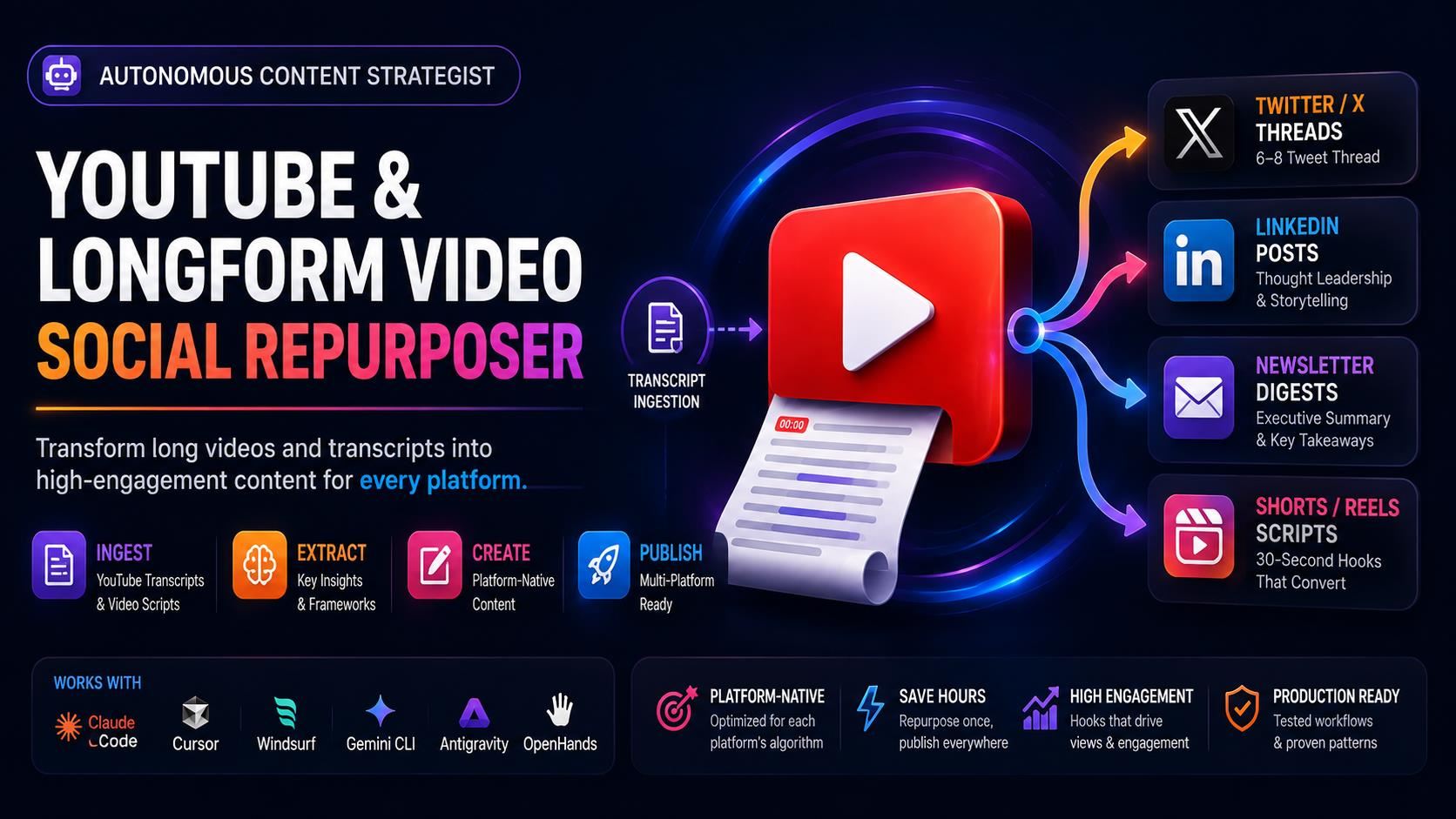
The YouTube & Longform Video Social Repurposer skill treats this as a pipeline problem: one ingestion step, one distillation step, four platform-specific output steps, each with its own word count, structure, and hook rules pulled directly from what that platform's audience actually reads.
Phase 1, Transcript Ingestion & Narrative Distillation
Before any copy gets written, the skill runs a cleanup pass on the raw input: stripping timestamp chatter, filler words, speaker labels, and repetitive conversational loops that auto-generated YouTube captions are full of. What's left gets mined for 3 to 5 pivotal insights, contrarian opinions, frameworks, or concrete action steps, rather than a generic summary of "what the video was about."
This matters because a thread built from an un-cleaned transcript reads like a caption dump. A thread built from 4 distilled insights reads like someone actually watched the video.
Phase 2, The Twitter/X Thread: Modular Slotting, Not Guesswork
This is the part with real math behind it. The skill builds threads in three fixed lengths, 6, 7, or 8 tweets, and each length has an exact slot map:
| Thread Length | Hook | Core Insight Tweets | Summary Matrix | CTA |
|---|---|---|---|---|
| 6 tweets | Tweet 1 | Tweets 2-4 (3 insights) | Tweet 5 | Tweet 6 |
| 7 tweets | Tweet 1 | Tweets 2-5 (4 insights) | Tweet 6 | Tweet 7 |
| 8 tweets | Tweet 1 | Tweets 2-6 (5 insights) | Tweet 7 | Tweet 8 |
Tweet 1 is always a single high-curiosity line built around a surprising outcome or counterintuitive metric, not "here's what I learned today." The Summary Matrix tweet compresses the whole thesis into a scannable bulleted TL;DR, and the CTA tweet closes with a link to the source video, a newsletter, or a product, depending on what the request specifies.
Phase 3, LinkedIn: Built for the "See More" Cutoff
LinkedIn truncates posts after roughly two lines on mobile, so the skill treats lines 1-2 as the entire pitch: a bold contrarian statement or a career/business lesson has to earn the click before the fold. From there it builds a 150-250 word post structured as 3-4 short paragraphs separated by double line breaks, no dense walls of text, closing with a takeaway and a low-friction discussion question designed to pull comments rather than just likes.
Phase 4, Newsletter Digest: 300 Words, Four Fixed Blocks
For Substack or Beehiiv-style formats, the skill compresses the video into a 300-word issue with four required blocks: a catchy subject line and preview header, an executive summary under 50 words, a deep-dive section carrying key quotes, and a resource links / next-actions block. The 50-word cap on the executive summary is deliberate, it forces the skill to pick the single most important claim from the video instead of restating the whole thing.
Phase 5, Shorts/Reels Script: Timestamped to the Second
The last output is a vertical video script with visual cues mapped to exact seconds, structured like this:
[0:00 - 0:03] Hook (Visual + Text on screen)
[0:03 - 0:22] Rapid Value Delivery (Fast cut transitions)
[0:22 - 0:30] CTA / Follow prompt
That 19-second middle block is the tightest constraint in the whole skill, it forces the rewrite to fit one core insight, not three, into the time a viewer actually stays before scrolling past.
How to Repurpose a YouTube Video Into Social Media Posts, Step by Step
Install is a copy operation. In Claude Code, the SKILL.md file goes straight into the project's skills directory:
mkdir -p .claude/skills/youtube-to-social-repurposer
cp SKILL.md .claude/skills/youtube-to-social-repurposer/
Then a single natural-language prompt triggers all five phases against a pasted transcript:
"Using the youtube-to-social-repurposer skill, take this 15-minute video transcript
on AI Agents and generate a 6-to-8 tweet thread, a LinkedIn post, and a 30s Shorts script."
Because the skill runs entirely on the transcript text handed to it, there are no external network permissions required, the whole distillation and repurposing pass happens inside the local agent session, which also means there's nothing to configure for API keys or third-party scraping.
Why It Doesn't Read the Same on Every Channel
The skill's core rule is a platform-native formatting invariant: it will not post identical copy across channels. A Twitter hook and a LinkedIn hook come from the same underlying insight but get rewritten for how each platform's audience actually scrolls, Twitter rewards a one-line punch, LinkedIn rewards a two-line setup before the cutoff. Paragraphs across every format stay under two sentences, which is less about style and more about how content actually gets read on a phone screen.
Frequently Asked Questions
Can it handle raw, auto-generated YouTube captions with timestamps and filler words?
Yes. Phase 1 strips timestamp chatter, disfluencies like "um" and "uh," and speaker labels before any insight extraction happens, so a messy auto-caption export works as input without manual cleanup first.
Does it work with tools other than Claude Code?
The skill is verified for Claude Code, Cursor, Windsurf, Gemini CLI, Google Antigravity, and OpenHands — the same SKILL.md file loads into any of them, following each tool's own skills-directory convention.
What license comes with the $15 purchase?
It ships under a Commercial Developer License (Single-User, No Resale): unlimited internal use, client work, and commercial projects, but redistributing or reselling the raw SKILL.md file is not permitted.



Comments
Comments are reviewed before appearing publicly.
No comments yet — be the first.